
Digital Signage4 min read
Digital Signage for Bakeries: Show Fresh Offers at the Right Time
From the morning coffee deal to the afternoon cake selection, Televora helps bakery teams keep screen content timely, editable and easy to manage.
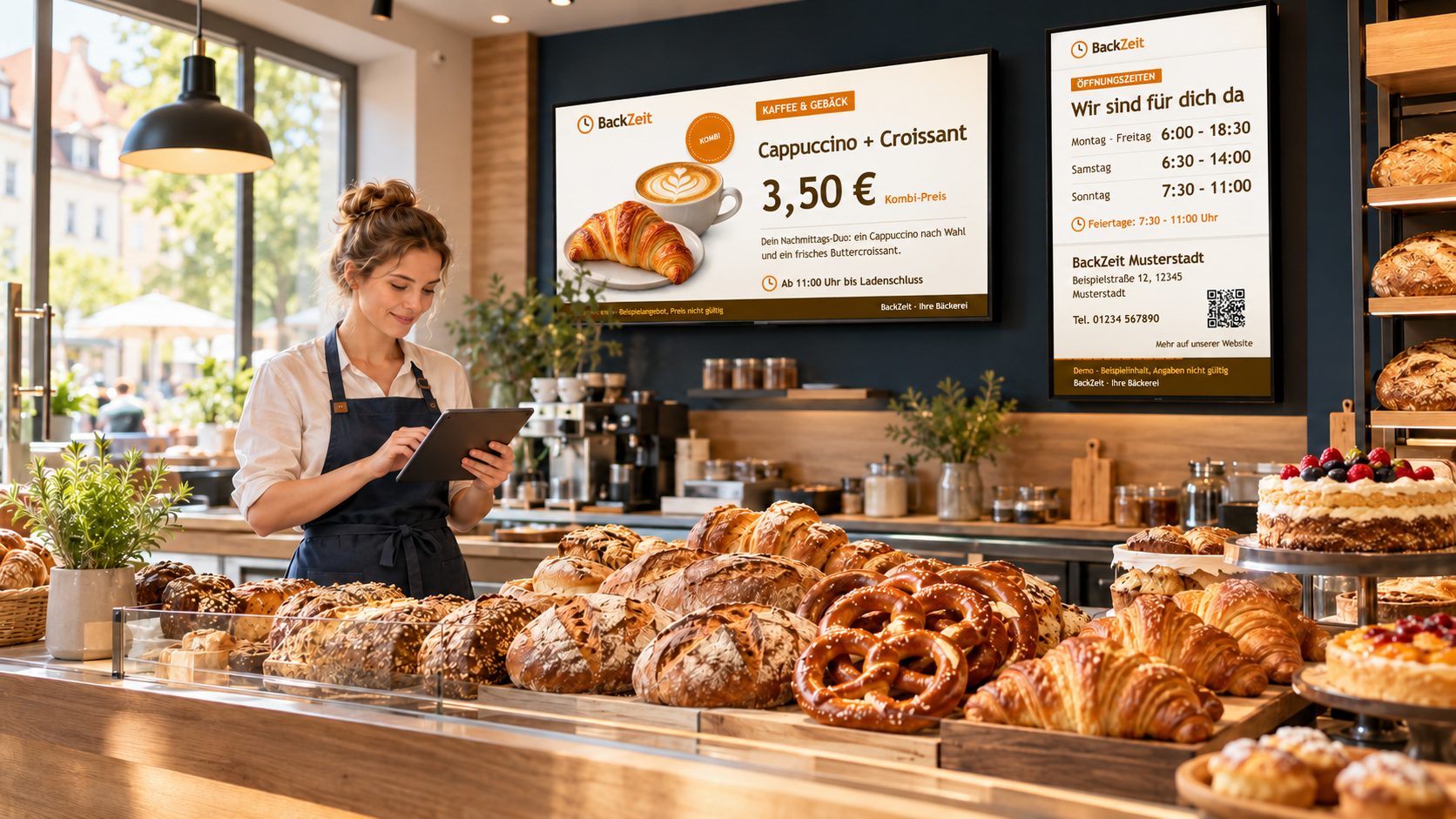
Put today’s bakery range on screen
A bakery’s offer changes throughout the day. In the morning, customers may be looking for coffee and a pastry. Around lunchtime, sandwiches and savoury snacks take the lead. Later, a cake or seasonal special may deserve attention. A digital screen makes it easier to present the right products at the right moment—and to update the message when the range changes.
With Televora, a bakery team can create screen content, organize it into playlists, schedule when it should play and manage connected screens centrally. Product names, prices, descriptions and images can be kept editable, so a new offer does not require rebuilding every design.
Make product offers easier to prepare
Start with a reusable layout for the products customers ask about most: breads, rolls, breakfast combinations, sandwiches, cakes and seasonal items. Keep each product’s image, name, price and short description in editable fields. The design can stay consistent while the bakery changes the offer.
For a single shop, staff can update content in the Televora workflow. Where a bakery already manages product information in a spreadsheet or business system, Televora supports data-driven content using CSV, Excel or API sources. The exact connection and refresh behavior depend on the chosen source and setup; confirm the mapping and check the screen after a change.
Schedule content for the day
One screen can support several parts of the bakery day. For example, a team could schedule a breakfast playlist in the morning, a lunch selection around midday and coffee-and-cake content in the afternoon. These are planning examples: use the bakery’s confirmed opening hours, current range and local routines when setting actual times.
- Prepare the content. Build a playlist for each part of the day, or combine related offers into one playlist.
- Set the time window. Schedule by time, weekday or date, and choose the intended screen or branch.
- Review the handover. Check the schedule so the next offer starts when expected and outdated content does not continue playing.
- Make a live update when needed. If an item sells out or a new batch is ready, update the relevant content or ticker and verify the result on screen.
Playlists can use individual item durations and transitions. That helps a bakery give a key offer enough time to read without showing every menu item for the same length.
Keep updates useful and accurate
A “fresh from the oven” notice, a sold-out message, an adjusted price or a change to today’s lunch offer can be more useful than a full redesign. Authorized staff can update screen content through Televora’s management tools. With Televora MCP connected to an approved AI assistant, they can also describe a supported change in chat, review the proposed target and wording, then follow the workspace’s approval process.
For example: “Update the bakery screen with today’s rye rolls at the approved price, keep the breakfast offer until 11:00, and show the new sandwich offer from 11:00. Prepare the changes for review.” Prices, product details, allergens and availability should always be checked against the bakery’s current source before they appear publicly.
Useful features for one shop or several branches
- Time-based scheduling: plan content by time, weekday or date instead of changing the screen manually at every transition.
- Central and local control: manage a shared menu across branches while assigning local notices to the relevant screens, depending on workspace structure and permissions.
- Mobile operations: check screen status, refresh a player or manage media from a phone using the Televora mobile operations workflow.
- Screen formats: adapt the layout for landscape and portrait displays so prices and product names remain easy to read.
- Offline resilience: already delivered and cached content can continue playing during a connection interruption. New cloud edits and live source data need connectivity to reach the player.
See the bakery screen demo
The supplied live player offers landscape and portrait directions. Open the bakery screen demo to view the screen format and content in the player.
Frequently asked questions
Can bakery offers change automatically during the day?
Televora can schedule playlists by time, weekday or date. A schedule must be configured with the correct screen targets and local operating times.
Can staff change an offer while the bakery is open?
Authorized users can update content through the configured Televora workflow. For data-driven content, changes can come from a connected CSV, Excel or API source. The update reaches the player when the source and publishing workflow are configured and the device is connected.
Can one offer appear in landscape and portrait?
Content should be adapted to each display ratio. The supplied demo player includes both landscape and portrait directions, so teams can compare how the content fits each screen.
Make bakery screens easier to keep current
Televora helps bakery teams organize product offers, schedule them around the day and update connected displays when the menu changes. Start with one screen and a small set of reusable playlists, then expand the workflow as your team and locations need it. Explore Televora’s digital signage features.
Televora for your studio or practice?
Try it free for the first month or book a personal demo.
More posts
Digital Signage4 min read
Televora Screen Overlays: Update Ticker Messages with MCPTechnology1 min read
APIs and WebSockets: how Televora integrates with external systems